
 Kashifa Jafar
Technology Writer & Contributor
Kashifa Jafar is a technology writer and
contributor with 4+ years of experience
creating clear and reader-friendly
technology content.
Read Full Bio of Author →
Kashifa Jafar
Technology Writer & Contributor
Kashifa Jafar is a technology writer and
contributor with 4+ years of experience
creating clear and reader-friendly
technology content.
Read Full Bio of Author →
 Sameena Begum
Technology & Digital
Content Reviewer
Sameena Begum is a technology and digital content reviewer who reviews selected articles to help ensure that information is presented clearly, accurately, and responsibly.
Read Full Bio of Reviewer →
Sameena Begum
Technology & Digital
Content Reviewer
Sameena Begum is a technology and digital content reviewer who reviews selected articles to help ensure that information is presented clearly, accurately, and responsibly.
Read Full Bio of Reviewer →
Table of Contents
Introduction – Deco Pic App
Deco pic App: Over the past few weeks, many Galaxy smartphone users woke up to a new Samsung app seemingly installed on their phone overnight. It’s called DECO PIC. At first, it looks like it downloads and installs without the user’s consent. And you have already split it in our apps drawer
It has a wide variety of applications available on the galaxy store. Samsung phones do not install Apps without your permission, and it simply creates shortcuts for App that already was on your phone but stand hidden inside the default Camera app.
This App from the galaxy store openly acknowledges its access to your phone, location, and microphone, none of which are typical for photo editing apps Samsung’s photo and video editing tool, Deco pic, has several features, such as a live sticker mask. Some permission should not require for photo editing apps, and specific photo editing programs also need access to photo editing programs.
How Does Deco Pic App Work
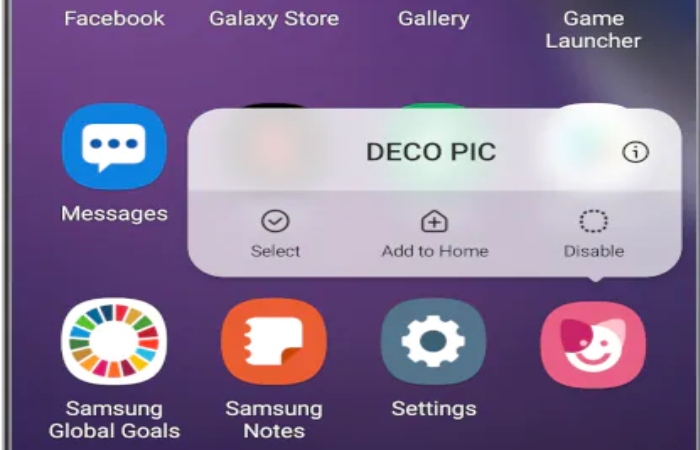
DECO PIC is a set of creative tools available for Galaxy users to create fun and the silly picture they post on social media. It started an extra mode for the Camera app, but many customers were unaware of its existence. A shortcut added to your screen promote the creative tool and help you make funny photo and video with live sticker, mask, and frames.
DECO PIC requires some permission part of providing the service to consumers:
- Camera: Give graphic effects photos or videos.
- Audio: Record sound recording video.
- Storage space: To save recorded pictures.
Therefore, the sticker effect is applied to preview the image, tap to take a photo or press, and hold to record the video. Experience various live stickers with your friend and share joyful moments.
You will ask to Allow that permission the first time you use the App.
Many photo-editing applications store temporary image files on your device, and understanding how app cache files work on Android can help users manage storage more effectively.
Permission – Deco pic App
Ask for permission if you use the App for the first time. It includes access to a camera, audio, and storage space. As mentioned, the DECO PIC is a creative tool that helps you make entertaining photos and videos to share on social media. The App offers multiple AR categories, including GIFs, masks, frames, and stamps. In addition, you can also search for download/buy AR live stickers from Galaxy Store.
- Camera: Give graphic effects, photos, or videos
- Storage space: To save record picture
- Audio: To record sound when recording video
Hence, To provide app service, the following permission is required.
For an optional license, you still use the service’s basic features even if you did not permit them.
[Optional permission]
- None
Users concerned about privacy while using mobile applications may also want to learn about Salesforce security and data protection practices in modern digital platforms.
Features – Deco pic App
Samsung is a popular brand with impressive features and outstanding quality.
- It has provided many apps that help improve the users’ experience, and the Deco Pic app also appears to improve the use and workability of Samsung.
- This guide lets you know all about the Samsung app and its workability.
- Remarkably, Samsung introduced a different application for users to enjoy, but recently Samsung has fixed an application named DECO in Galaxy’s new device.
- As we have described, the Deco app has outstanding features, providing very enjoyable movements for the users when they have a chance to use them.
- DECO has many beautiful frames to decorate pictures, and when the users interact with these get very rhythmic movements.
GIFs:
Gift GIFs are those enjoyable stickers the user applies to preview an image. When searching and using different matches and terms, GIF images help retrieve pictures.
Masks:
There are many unique and impressive masks the user can apply on their face. These masks show interesting effects according to facial expression, making a special look viewing the user’s face.
Stamp:
Stamps help plenty of letters to decorate pictures, and these Stamps also have a crucial role in improving the level of an image.
View More:
It is another impressive feature of deco pic to offer Chan users more stickers
Besides creative tools like Deco Pic, many professionals use digital productivity and analytics platforms to streamline their daily workflows and reporting.
How to Install – Deco pic App
Samsung is always tried to give the user a unique experience. Before this, they surprise their user also by placing the applications in their app list via Galaxy Store.
The Deco Pic App is one of them. It was automatically installed on most flagship Samsung Galaxy Phones, so users think the application is strange and should be removed. They also share feedback with Samsung because these applications ask the phone to access the camera, storage, and audio.
After a few days, the user knew the truth and enjoyed the application. The Galaxy Owner vanishes all the rumours about the stranger app Deco Pic by sharing a short description.
Process – To Install the Deco Pic App
If you want to download Deco Pic App for your device, Here is the simple process to download and install it.
We have a public Telegram Channel where we have public of the kind of application updates in different types of versions, so you have to visit our Telegram Channel to download the Latest version Of the Deco Pic App.
Download the App by clicking on the Download button above, then click Install. Once you have installed it, please give them the permission that App asks for; after that, you can use Deco Pic App perfectly.
If you need assistance with app-related issues, understanding online customer support and help desk systems can make troubleshooting much easier.
How to Uninstall App
- Many users have posted about difficulty uninstalling Deco Pic from their devices.
- While some claim they’ve successfully uninstalled the App in developer mode, others say they can disable it on their device but not uninstall it
- One Redditor claim they uninstall using the system app manager on their device, although that cannot be confirmed.
- Still, it is worth giving it a shot, so users who want to try to go to ‘Settings,’ select ‘App.
- ‘ Find ‘Deco Pic,’ then hit the three-dot menu button at the top-right and select ‘Uninstall Updates.’ It will reportedly uninstall the new update of the Deco Pic app on Samsung.
Mobile users who enjoy sharing edited photos online may also be interested in connecting Discord with PlayStation 5 to enhance their gaming and social experience.
Conclusion
Deco pic is a Galaxy app that provides users with exceptional features to create their preferred video and photo by using different frames, Gifs, masks, and stickers with a creative mind. More interestingly, it helps the users not to find any other application for editing video or photo, and it has all the editing features to assist the user. If you want more information about how App works, check it from the above body of text.
Kashifa Jafar is a technology writer and contributor with 4+ years of experience covering AI, cloud computing, mobile technology, software, networking, cybersecurity, and emerging technology.
View Author Profile →
Sameena Begum is a technology and digital content reviewer who reviews selected articles to help ensure that information is presented clearly, accurately, and responsibly.
View Reviewer Profile →